 Carson Fleming
![Thinkpad X1 Carbon Review [G13]](https://cdn.cflems.net/assets/x1c28fac29f.jpg)
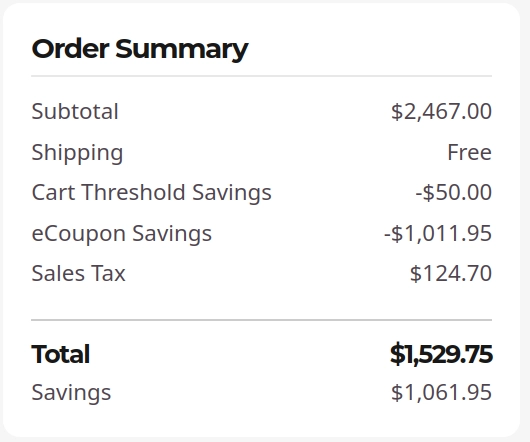
It was just recently Black Friday at Lenovo dot com and I was giving the Thinkpad section a casual browse, when I came upon something truly startling: an X1 Carbon Gen 13 listed for an amount it's actually worth. If you've read my Thinkpad X9 take, you'll be aware that I did a fair bit of malding that they attempted to sell this highly comparable alternative (these were the two laptops I was considering) for the ludicrous sum of $3600. All's well that ends well, though, because in the year of our lord two thousand and twenty five, that laptop now starts nearly one third of the original asking price, only $1300 for the Core Ultra 5 226V model. I tacked on the processor upgrade to the Ultra 7 258V for only $100 extra, which is well worth it for doubling the RAM and meaningfully improving the iGPU. This price was so competitive I literally paid the carbon offset fee, because might as well in the off chance it actually does something. All that came out to the price tag you see below, and now they've finally gotten the laptop in my hands, so let's take a look.
First Impressions
I was looking for the same sex appeal on this machine that I found on the X9, and it's not really there, at least on the exterior. It's not ugly by any means, it just looks kinda utilitarian--like a work machine, and that's what I've decided this will be. Aesthetically though, I do prefer the screen size produced by the 16:9 aspect ratio screens of the past, so this version with the reverse notch is much more pleasing than the Gen 10's 16:10 rectangular screen.
It's also light as fuck. My genuine first thought upon holding this machine was "is it made of cardboard?" Between the surface, which feels less rubbery/plasticky than previous X1 Carbon generations I own (and more... papery? I want to say), and the nonexistent weight, for a split second I thought I was picking up a replica or a piece of packaging rather than the laptop itself.
On the internals, the screen is extremely decent. I got the 2880x1800 non-touch OLED screen, and I have nothing to complain about. It doesn't shock me in any way--I'm used to the OLED color palette after using the X9 for so long, but the screen does get an extra 100 nits of brightness over the one I have on the X9, and that is far more than I need in my lamplit apartment after the sun's gone down at 4pm. In my office it does get quite bright at certain times of day, though, so that will likely be helpful.
I also quite enjoy the keyboard. Despite having lower key travel than the Gen 6, which was my previous favorite, the Gen 13 has brought back the springiness that was lost on the Gen 10. If I hadn't gotten used to the X9 this would probably be my favorite keyboard I've ever used, but since I have it'll have to settle for extremely solid.
Linux Install Experience
Fucking spotless. And it should be, I bought this with Ubuntu preinstalled, which implicitly means that all the drivers and hardware are supported. This was my first time buying a laptop with Linux preinstalled, and therefore also my first time seeing the Ubuntu OEM installer, but honestly it leaves a bit to be desired. Don't get me wrong, it looks better than basically anything any other distro has ever put out, but it's less pretty and less functional than the regular install CD at which point you have to wonder, why bother?
In my case the "why bother" was I didn't want to lose any kind of custom audio configs or firmware patches that Lenovo had jerry-rigged specially for this machine, but the OEM installer did not have an option for full-disk encryption, so that was dead on arrival. I did, however, install Ubuntu 24.04 LTS without incident. I had originally intended to install 25.10 for the newer kernel/go through the whole rigamarole that I went through being an early adopter of the X9, but everything just... worked out of the box. Seems like all the kernel stuff has been backported already, and it even found the OEM-specific APT repositories it needed to pull from automatically. It's a pleasant find, and makes me wonder whether the X9 works out of the box on 24.04 now too (edit: it does, in fact). Secure boot, etc. are also configured correctly for Linux since it came preinstalled so the only thing I had to do in BIOS was swap the Fn and Ctrl keys.
Performance
Despite this having the 258V processor instead of the 268V I got in the X9, the GeekBench performance is actually slightly better. Results are:
Single-core: 2823
Multi-core: 11227
And of course, compilation results:
Single-core (clang): 2905
Multi-core (clang): 15555
Full Report (X1 Carbon G13) | Full Report (X9-14)
This vindicates my decision not to spend an additional $400 on 100MHz of clock speed and a bunch of corporate spyware features that I'd be immediately turning off in BIOS anyway. While the compilation speed is slightly worse, it's not remotely noticeable, and the increased speed of everything else makes the system feel very slightly smoother. I suspect that this minor difference has more to do with the display--the 2880x1800 display on the X1C13 fits nicely at a 200% scaling ratio, whereas the 1920x1200 on the X9 leaves me at a weird 140% to get a comfortable font size. This leaves me somewhere between the 125% and 150% fractional scaling options, so I use the GNOME large text accessibility option to achieve the desired zoom instead, but I suspect this is slightly more resource intensive in the background than just scaling everything by 2.
I've been using this as a work machine since I got it, and I haven't had any complaints so far. Even juxtaposed with the M4 Max Macbook Pro that I switch off with for certain tasks it never feels slow or sluggish. If you're a developer and you actually write code rather than spam 60,000,000 Docker containers (which apparently is what laptop reviewers think we do) all day, the performance on this gets a solid A. If you're a gamer it also can play a surprising amount of stuff at 120 FPS, but I'm not rating it THAT high. I'll give it like a B. The Lunar Lake iGPU is really impressive and can certainly play anything pre-2016 with ease, but you really do want a dedicated GPU if you play ranked R6 Seige or anything like that.
Conclusions
Honestly, I wish there was more to tell. I only wrote the X9 take because getting it working was like wrangling a live bear, this was just easy street.
This is an extremely solid 8 or 8.5/10 laptop. One you can take home, introduce to your family, and see yourself with for many years to come. It will do everything you need it to, there's nothing particularly lacking that will have you glancing over jealously at other laptops, and it's particularly easy to carry around as a cherry on top. But, it's not one worth spending all your money on, either. There's nothing particularly impressive about this that justifies a >$2k purchase. If they ever hike the price back up, just buy the X9 instead. It's the same thing in a heaver but better-looking package.